Customize Termux Welcome Screen.
“How to Customize Termux Make Termux terminal look Awesome – Termux android App se related humne phale bhi kuch post likhi hai termux me kaise tools install karte hai, termux all command etc, but aaj Hum iss post me Sikhege ki termux ko kaise customize karte hai, like font style command color etc.
termux me hume kuch bhi karne ke liye tools ki jarurat padti hai or yaha sabhi work command line base hota hai. command se hi hum termux App me hacking practice karte hai.
“How to Customize Termux Make Termux terminal look Awesome – Termux android App se related humne phale bhi kuch post likhi hai termux me kaise tools install karte hai, termux all command etc, but aaj Hum iss post me Sikhege ki termux ko kaise customize karte hai, like font style command color etc.
termux me hume kuch bhi karne ke liye tools ki jarurat padti hai or yaha sabhi work command line base hota hai. command se hi hum termux App me hacking practice karte hai.
How to Customize Termux Make Termux terminal look Awesome – ANCII, Color, Font, Style
Sabse phale hume termux me Welcome screen me jo bhi text aate hai unhe remove karna hoga. jaise hi aap termux App ko open karte hai toh asa kuch phale se he likha aata hai-
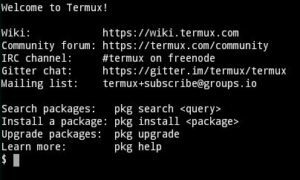
How to Remove termux Welcome screen Text
Open Termux app and type-
cd ..
ls
cd usr/etc
ls
rm -rf motd
- Open new terminal, and see the termux terminal is totally clear.
In command ki help se termux ki welcome secreen per jo bhi text aate hai wo nahi aayege aap new session on kar ke dekh sakte hai.
How to Insert ANCII txt in your termux terminal
Termux Terminal me ANCII text insert karne ke liye hume kuch command type karni padegi-
Open new session in termux and type following command
pkg install figlet
pkg install nano
again new session open & type -
cd..
ls
cd usr
ls
cd etc
ls
nano bash.bashrc
Ye sabhi command type karne ke baad Ek asi screen Open hogi
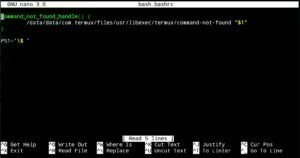
Ab Iss screen me aapko kuch edit karna hai-
type following command
figlet -f standard yourname
after all process termux welcome scree look like awesome no other text


0 Comments